Ergonomics

TV Mounting Height: The Ergonomic Guide to Comfortable Viewing

By Elena Rodriguez, Chief Product DesignerJune 5, 202611 min read

Mounting a flat-screen television on a wall is a popular design choice, but it is frequently done incorrectly. The temptation is to mount the TV as if it were a piece of artwork—high up on the wall, or centered over an active fireplace mantel. However, viewing a television is an active, sustained visual task. When a screen is placed too high, viewers are forced to tilt their heads backward at an unnatural angle. Sustained upward head tilt puts pressure on the cervical spine and strain on the neck muscles, leading to headaches, neck soreness, and shoulder pain over time.

Choosing the right height to mount your TV is critical to your health and viewing comfort. Many homeowners do not realize that watching a screen placed too high forces the neck to remain in a state of extension, which can lead to repetitive strain injury (RSI) in the neck and upper back. Additionally, looking up at a screen can cause eye strain and dry eyes, as the eyelids are opened wider than they are when looking slightly downward. In this comprehensive guide, we will explore the math behind the ergonomic center-line formula, outline professional cinema standards, provide a step-by-step mounting guide, and discuss how to handle mounting above a fireplace.

Biomechanical Impact of Screen Placement

The human head weighs approximately 10 to 12 pounds. When your neck is aligned straight, the muscles easily support this weight. However, for every inch your head tilts backward or forward, the effective load on your cervical spine increases. Tilting your head back by 15 to 20 degrees to look up at a high TV screen causes the neck muscles to work twice as hard to support your head. Over a 2-hour movie, this static muscle load restricts blood flow, causing tension headaches, muscle knots, and shoulder stiffness. Over years, it accelerates degenerative disc changes in the neck. Keeping the screen center at eye level minimizes physical strain, keeping your head in a natural, neutral position.

The Ergonomic Center-Line Formula

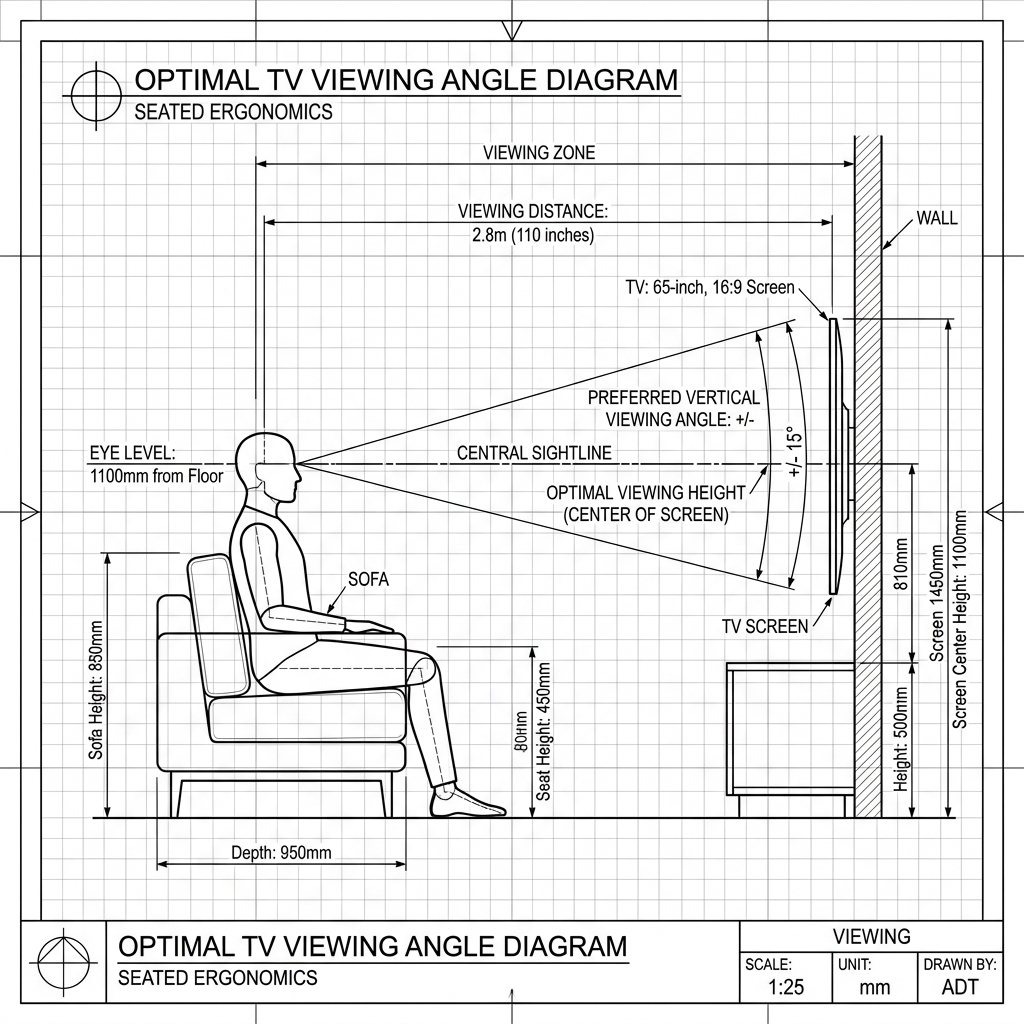
To eliminate physical strain, your television should be positioned so that the center of the screen aligns directly with your eyes when you are seated in your primary viewing position. Here is how you calculate this height:

  • Seated Eye Level (H1): Measure the height from the floor to your eyes while sitting on your primary sofa. For most standard sofas and average adults, seated eye level is between 36 and 40 inches.
  • Screen Height (H2): Determine the physical vertical height of your television screen (not the diagonal measurement). A 65-inch TV has a screen height of approximately 32 inches.
  • Ideal Center Height: The center of the television screen should be positioned exactly at your Seated Eye Level (H1).
  • Lower Edge Placement: Subtract half of the screen height (H2 / 2) from your Seated Eye Level (H1) to find the mounting height for the bottom edge of the TV frame. Our TV Mounting Height Calculator handles this math for you.

SMPTE and THX Viewing Standards

Professional home theater installers rely on standards from the Society of Motion Picture and Television Engineers (SMPTE) and THX. SMPTE standard EG-18 recommends that the maximum vertical viewing angle should not exceed 30 degrees. This means the top of the TV screen should never be higher than 30 degrees above your horizontal line of sight. THX goes further, recommending a maximum vertical viewing angle of 15 degrees for optimal viewer comfort. Regarding viewing distance, THX suggests multiplying the diagonal screen size by 1.2 to find the minimum distance in inches. For example, a 65-inch TV requires a viewing distance of approximately 78 inches (6.5 feet) to fill 40 degrees of your field of view, creating a cinematic experience without causing eye fatigue.

Step-by-Step Mounting Walkthrough

Follow these steps to hang your TV at the perfect ergonomic height:

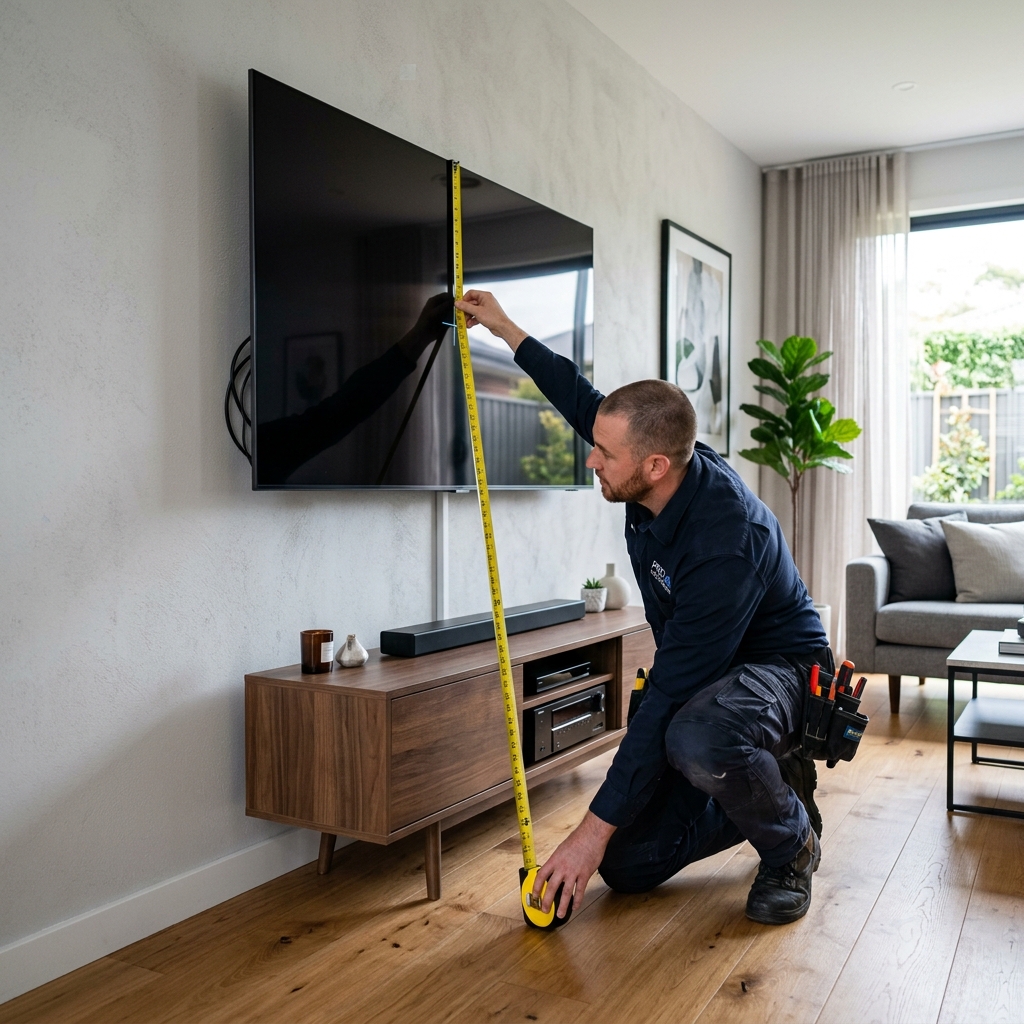
  • Step 1: Sit and Measure: Have someone measure the height from the floor to your eyes while you sit on your sofa. Write down this number (e.g., 38 inches).
  • Step 2: Measure the TV Screen: Measure the outer height of your TV frame. Divide this number by 2 (e.g., a 32-inch high TV yields 16 inches).
  • Step 3: Calculate the Bottom Edge: Subtract the half-height from your eye level. (38" - 16" = 22"). Mark 22 inches on the wall—this is where the bottom of the TV should align.
  • Step 4: Locate Wall Studs: Use a stud finder to locate the studs behind your drywall. Mark the center of each stud to ensure the mount can support the weight of the TV.
  • Step 5: Install and Adjust: Screw the mounting plate into the studs. Hang the TV and use a level to verify it is straight. Adjust brackets to eliminate any reflections from lamps or windows.

Mounting Over a Fireplace: Pro-Tips

Mounting a TV above a fireplace is generally not recommended due to heat, soot, and poor viewing angles. However, if space constraints force you to do so, follow these tips:

  • Use a Pull-Down Mount: Invest in a specialized mantle mount that allows you to pull the TV down to eye level when in use, and push it up when the fireplace is active.
  • Verify Heat Exposure: Place a thermometer on your mantle. If the temperature exceeds 90°F (32°C) while the fire is lit, the heat will damage the TV's internal circuitry.
  • Angle the Screen Down: If using a fixed mount, select a tilting model. Angle the screen down by 10 to 15 degrees to match your viewing angle and reduce neck strain.

Resolving Light Glare and Reflection Issues

In addition to mounting height, light reflections can significantly degrade your viewing experience. When a TV is positioned directly opposite a window or under bright overhead lighting, glare can make the screen difficult to see, prompting you to strain your eyes. To prevent glare, avoid placing the TV opposite west- or south-facing windows. If this layout is unavailable, install blackout curtains or light-filtering cellular shades. Additionally, position floor lamps and table lamps to the side of the television rather than directly in front of it. Using 'bias lighting'—a soft LED light strip mounted behind the TV screen—can reduce eye strain by increasing the ambient light level behind the display without reflecting off the screen surface. By optimizing both mounting height and room lighting, you create a comfortable, healthy, and high-performing home theater setup.

📺

Need to calculate measurements for your space?

Use our free, interactive TV Mounting Height to calculate dimensions, box requirements, or guidelines automatically.

Calculate Your TV Mounting Height
← Back to all blog posts